Skin analysis technology in retail works in four steps: a camera captures the shopper's face, a model finds facial regions and rates visible concerns, product rules turn those ratings into a short list from the store's own range, and staff or the screen explain the result. The technology is the same whether the camera is a phone at home or a tablet on your counter. What changes in a shop is the setting around it: lighting, staff, time pressure and the fact that the shopper can pick up the product right there.
I've seen beauty stores spend serious money on dedicated scanning hardware and then barely use it, because staff weren't sure what to say once the result appeared. The tech was fine. The workflow wasn't. So this post covers both.
The scan described here is a cosmetic analysis for shopping guidance. Not a medical diagnosis; does not replace a dermatologist.
What happens between the selfie and the result
Capture
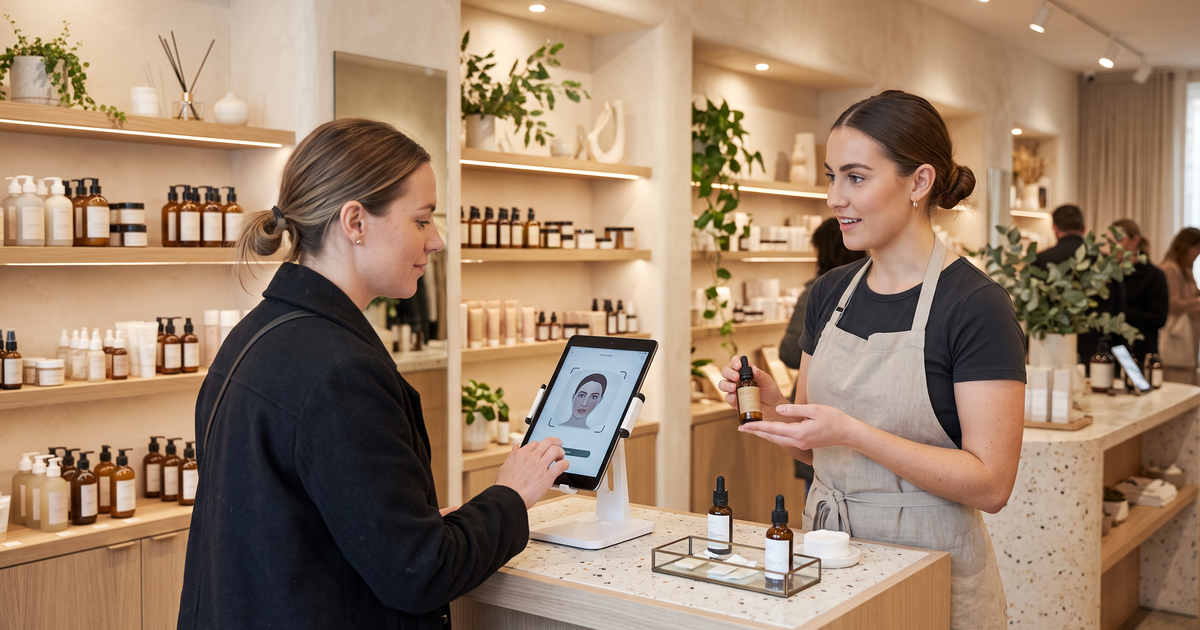
The shopper looks into a camera. At home, it's their phone. In-store, it might be a tablet on a stand or a mirror with a built-in camera. The image needs to be reasonably sharp, front-facing and evenly lit. Retail has an advantage here: you control the light.
Face regions
The model finds landmarks, such as the eyes, nose and mouth, and uses them to locate areas like the forehead, cheeks and under-eyes. Concerns are read in the regions where they show up. Eye bags only make sense under the eyes; pores are read across the cheeks and nose.
Concern ratings
Each concern gets a rating. Face Age reads 13 concerns across 250+ attributes: fine wrinkles, eye wrinkles, deep wrinkles, dark circles, eye bags, pores, pigment, redness, oiliness, dryness, sagginess, dullness and acne, with dryness, sagginess and dullness currently in beta. Each is rated low, medium or high, and there's a Skin Age estimate on top. The 13 skin concerns glossary is worth printing for staff.
Product matching
This is the step people forget is separate. The analysis doesn't "know" your products. You connect products to concerns and levels, add exclusions, and optionally combine the scan with quiz answers. The engine then shows the products that fit. How AI skin analysis picks products goes into the rules.
Explanation
The shopper sees their readings, the matched products and, if you've turned it on, an AM and PM routine. In a shop, this is where a staff member steps in.
Benefits of skin analysis technology in retail
Retailers ask me about benefits a lot, and I try to keep the list honest.
A conversation starter. Many shoppers won't ask for help. "Want to try a quick skin scan?" is an easier opening than "Can I help you?", and the result gives staff something specific to talk about.
Consistency across staff. A new hire and your most experienced advisor will recommend from the same product rules. That doesn't replace expertise, but it sets a floor.
Follow-up. With the shopper's consent, the result can go out as a PDF report or into your email tool, so the conversation doesn't end at the door.
One setup for shop and site. If the scan is browser-based, the same mapping powers your website. A shopper who scans in-store can scan again at home and compare.
What it won't do is sell for you. A scan sitting on a dusty tablet in the corner is a decoration.
In-store setup that actually gets used
Here's the setup I'd recommend for a small beauty shop or a shop-in-shop counter.
Hardware. A tablet on a sturdy stand at face height, near the products you most want to talk about. No dedicated device needed if your analyzer runs in the browser. We compared the device route with a browser-based scan in skin analysis device alternative.
Light. Soft, even, front-facing light. Avoid placing the stand under a strong downlight or with a bright window behind the shopper.
Page. Open a dedicated page on your own site that hosts the scan, so the in-store result looks like your brand, not a third-party app.
Script. Give staff three lines: an opener, how to read the result, and what to say if the shopper isn't interested in the suggested products. That last one matters most.
Hygiene and privacy. Wipe the screen between shoppers. Say clearly, on a small sign or on screen, that photos are analyzed by AI and how data is handled. Your privacy policy should mention AI skin analysis; Face Age provides a template.
How staff should use the result
The scan is the start of the conversation, not the verdict. A good flow looks like this:
- Show the result and ask, "Does this match what you notice?"
- Focus on the one or two concerns the shopper cares about, not all 13.
- Hand them the matched product to try on the back of their hand.
- Offer the PDF report or an email with the routine.
If a shopper mentions persistent irritation, pain or anything that sounds like a skin condition, staff should suggest a dermatologist. The scan is for shopping guidance.
Connecting in-store and online
The best part of a browser-based setup is continuity. Turn on Analysis History with Server API storage, and a shopper who gives their email in-store can see that scan later at home. With the Before and After Comparison, their next scan shows which concerns improved, regressed or stayed stable. History, comparison and branded PDF reports are on Plus and above; see the Shopify app plans.
For brands outside Shopify, the same features are available through the API on custom sites.
Where retail skin analysis is heading
Two trends are worth watching. First, more of the scan is moving from dedicated hardware to the browser, which makes small shops a realistic home for it. Second, shoppers increasingly arrive having already asked an AI assistant what to buy, so a scan in-store that gives a clear, explainable result fits how people now research. We covered the broader picture in latest trends in skin analysis technology and in how AI assistants change beauty product search.
FAQ
How does skin analysis technology work? A model reads a face photo, finds facial regions, rates visible concerns and passes those readings to product rules that pick items from your catalog.
Do I need a special device for in-store skin analysis? Not necessarily. A browser-based scan runs on a tablet on a stand.
What are the main benefits for a beauty retailer? A conversation starter for staff, consistent recommendations and consented follow-up.
Is a retail skin scan a medical assessment? No. Not a medical diagnosis; does not replace a dermatologist.