

1. App code not fully installed or loaded
1. App code not fully installed or loaded
- Make sure the app was installed correctly from the Shopify App Store.
- If you installed it recently, refresh your theme cache or try a different browser.
2. Theme compatibility issues
2. Theme compatibility issues
- Some Shopify themes block or interfere with app scripts.
- Switch to a default Shopify theme, such as Dawn, and check whether the app appears.
3. Old or conflicting code from previous apps
3. Old or conflicting code from previous apps
- Leftover code from similar apps you installed before can conflict with Face Age.
- Check the Chrome DevTools console for errors related to the app. See JavaScript errors below.
4. JavaScript errors or missing app blocks
4. JavaScript errors or missing app blocks
- JavaScript errors on your site can prevent the app from loading.
- Check that the app block is added to the correct page in your theme editor.
5. App embed not enabled
5. App embed not enabled
In Online Store → Themes → Customize, open App embeds and make sure Face Age is enabled.
7. Reinstall the app
7. Reinstall the app
- If the app still doesn’t load, uninstall and reinstall it to reset any misconfiguration.
- After reinstalling, refresh your store and test again.
JavaScript errors
JavaScript errors are the most common cause. Over time, customizations and installing or removing third-party apps can leave broken code behind. On Shopify, many issues come from old app code: uninstalling an app doesn’t always remove all of its code from your theme.Open the console in Chrome
- Mac: Cmd + Option + J
- Windows: Ctrl + Shift + J
- Old app code still loading on your site
- Broken file paths
- Typos in your code
- Misconfigured apps or scripts
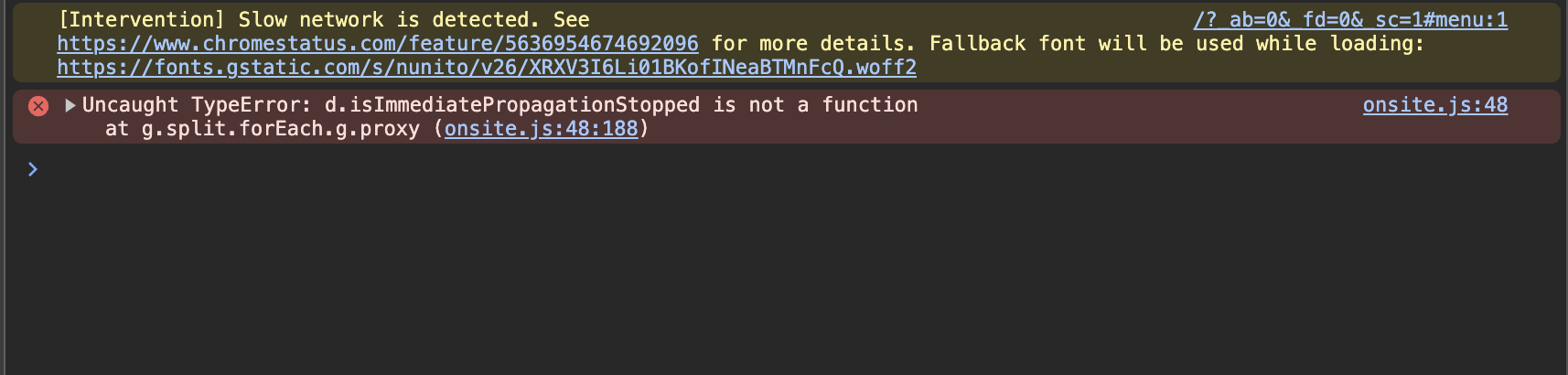
Debug console errors
- Code typos
- For syntax errors, click the file source (for example
index.js) to open the Sources tab. - Look for missing or extra characters, like an empty object
{}. - The cause can be a Shopify Liquid variable that is empty or mistyped.
- For syntax errors, click the file source (for example
- Missing resources
- Some errors show a failed resource load from an external domain, for example
bam.nr-data.net. - This usually happens when an app was removed but its scripts weren’t.
- Find out which app the resource belongs to and contact that app’s developer.
- Some errors show a failed resource load from an external domain, for example